This is the second of two articles.
The first covered development - themes, sections, and custom components.
This one covers the question many store owners care about even more: what is actually happening in my business, and why?
The framing is similar because the answer has the same shape.
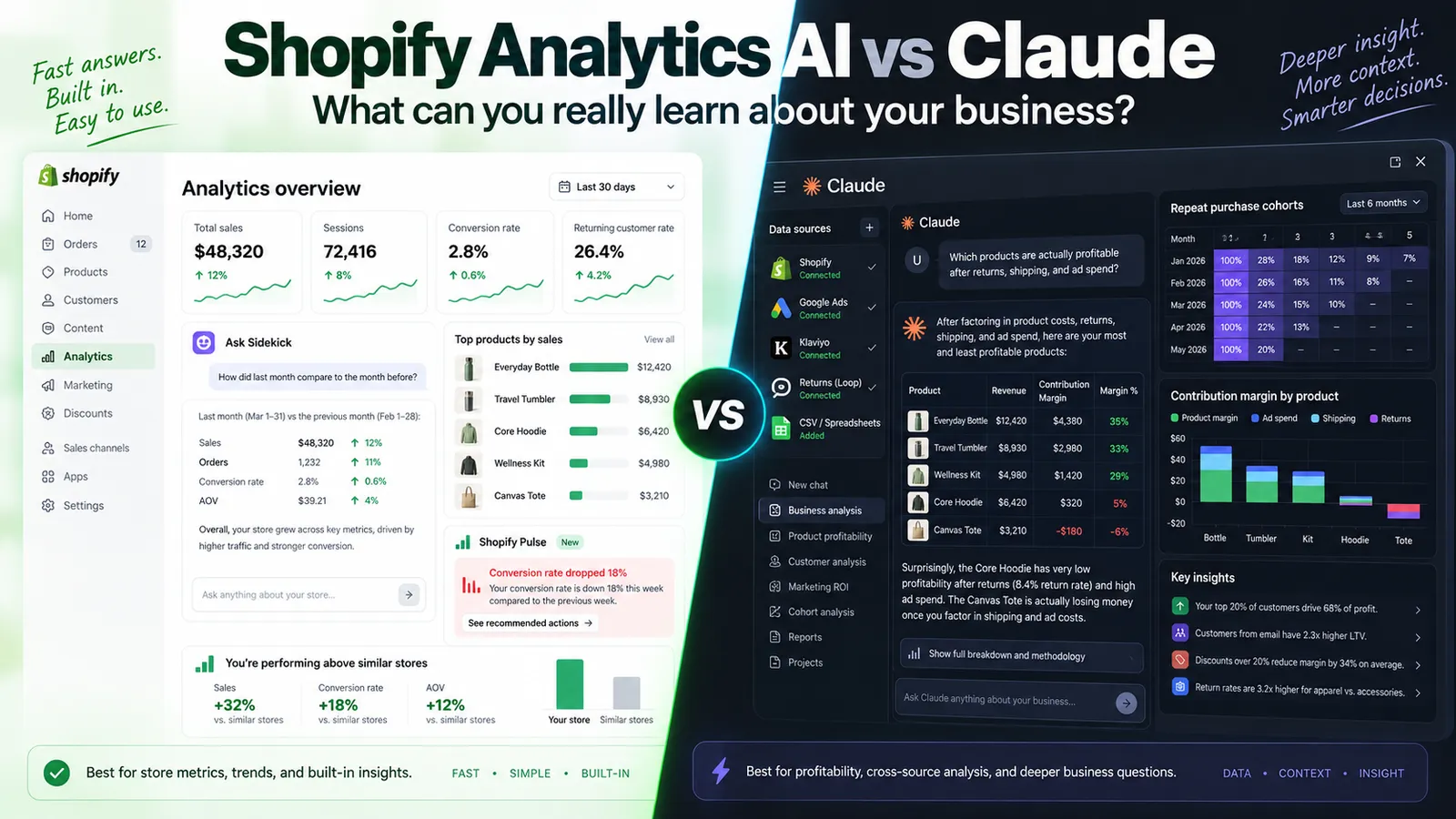
Shopify's built-in analytics AI handles common questions well, and it does so for free.
But for anything that requires joining data sources, reasoning across time, or asking questions Shopify never anticipated, a frontier model with real access to your data can do things the admin cannot.
The difference is even sharper here than it was on the development side.
And the reason is simple:
Shopify's analytics can only ever show you Shopify's data, in Shopify's framing, answering Shopify's idea of what you should want to know.
Most of what determines whether your store is truly profitable lives outside that boundary.
What Shopify's Analytics AI Actually Does
Shopify has invested seriously here, and the tools are better than many store owners realize.
Before paying for anything extra, it helps to understand what you already have.
Sidekick
Sidekick is the conversational assistant inside the Shopify admin.
It lets you ask questions about store data, request actions, and get recommendations in plain English instead of manually digging through dashboards.
For analytics, this is the main AI layer.
You ask a question naturally, and if the answer lives inside Shopify's data, Sidekick can usually give it to you.
That means it works well for questions about:
- Orders
- Products
- Customers
- Sessions
- Basic trends
- Common store performance questions
For those kinds of questions, it is genuinely useful.
No report builder. No export. No manual filters just to get a simple answer.
Sidekick Pulse
Pulse is the proactive layer.
Instead of waiting for you to ask a question, it surfaces business intelligence and growth recommendations on its own. It requires Network Intelligence to be enabled.
The idea is straightforward:
Instead of remembering to check whether something changed, the system tells you.
In practice, it is most useful for spotting obvious movements, such as:
- A product suddenly spiking
- A drop in conversion
- An inventory issue that may become a problem
- A notable performance change worth checking
The Network Intelligence part matters.
That means Shopify is benchmarking your store against broader aggregate patterns from across its merchant base.
That is a genuine advantage Shopify has and outside tools do not.
It is the one thing in this whole comparison that a custom external AI setup cannot truly replicate.
Flow
Flow sits next to analytics rather than inside it, but it still matters.
Insights are only valuable if they lead to action.
If your analysis tells you that people who buy product A rarely return, or that one segment behaves differently than another, Flow is where those findings can turn into automations.
It closes the loop between:
- Knowing something
- Deciding it matters
- Doing something with it
SimGym
SimGym tests store changes with AI shoppers before you launch them live.
This is most relevant for merchants focused on conversion work.
It is best treated as directional rather than predictive.
If a change is obviously broken, simulated shoppers can help reveal that.
But they are not substitutes for real buyers and real traffic.
The Standard Reports
These are easy to overlook because the AI conversation gets most of the attention.
But Shopify's built-in reports and analytics have become quite capable, especially on higher plans.
Before assuming you need a custom AI analytics stack, it is worth checking what your Shopify plan already gives you.
Where Shopify's Analytics AI Stops
There are three main limits.
The third is the one that matters most.
Limit One: The Economics
This is the same constraint we discussed on the development side.
Shopify runs these features across millions of merchants and does so without charging separately for most of them.
That means the models behind the experience have to be optimized for:
- Speed
- Cost
- Broad usability
For simple questions, that trade-off is invisible.
If you ask:
"What were my best-selling products last month?"
You will probably get a perfectly good answer.
But if you ask something like:
"Which customer segments are actually profitable once I account for returns, discounts, and the fact that some of them only buy on sale?"
That is a very different level of analysis.
And this is where you start to feel the ceiling.
Limit Two: The Harness
A product-layer AI assistant always operates inside a harness.
That means:
- Instructions
- Guardrails
- Context limitations
- Time limitations
- Restrictions on what data it can access at once
- Restrictions on how far it can iterate
Real analysis is not usually one question followed by one final answer.
Real analysis is iterative.
You ask something.
The answer raises a better question.
You follow that question.
Then the next question gets sharper.
That loop is where useful findings usually come from.
A bounded assistant is designed to answer a question well.
It is not designed to think through a messy business problem with you for an extended period.
Limit Three: Shopify Only Knows About Shopify
This is the biggest limitation.
Your business does not live entirely inside Shopify.
Your ad spend may live in:
- Meta
- TikTok
- Other ad platforms
Your email performance may live in Klaviyo.
Your support data may live somewhere else.
Your true product costs may live in a spreadsheet or accounting software.
Your shipping costs, return handling, supplier terms, and currency losses may all live outside Shopify too.
Shopify can tell you a product sold well.
It usually cannot tell you:
- Whether the customers buying it were expensive to acquire
- Whether those customers return it at a high rate
- Whether shipping both ways destroys the margin
- Whether the product actually loses money on every unit
Almost every store has at least one product like this.
And it is usually not the one the owner expects.
There is also a structural point underneath all of this.
Shopify's recommendations come from a company whose business grows when your gross merchandise volume grows.
Most of the time, those incentives align well enough.
They do not align perfectly.
Nothing in the admin is likely to suggest that:
- A category may not be worth selling
- A paid app is doing nothing useful
- A lower-complexity setup would be better
- You are focused on the wrong growth metric
That is not a criticism.
It is simply a reason to value a second opinion from a system that has no built-in stake in the conclusion.
The Attribution Problem Nobody Has Solved
This deserves its own section because it is becoming one of the biggest blind spots in ecommerce.
AI has become a meaningful traffic source.
Shopify has reported strong growth in AI-sourced traffic and AI-sourced orders. Independent survey work points in the same direction.
But the more important detail is this:
A large share of AI-influenced purchases do not happen inside the AI interface itself.
They happen later, on your site, after a conversation you cannot see, often with little or no clean referral data.
That creates a real attribution problem.
In an agent-led world, your analytics may start showing a growing share of traffic that looks direct or unattributed but converts unusually well.
And no dashboard can fully explain why.
This is not a problem you solve with one better chart.
What you can do is triangulate.
You can compare:
- Unattributed traffic patterns
- Product performance
- Search visibility
- Post-purchase survey answers
- Timing of AI-surface changes
- Order behavior over time
That kind of messy, multi-source, interpretation-heavy work is exactly where a custom AI analysis setup becomes more useful than a bounded admin assistant.
What Connecting a Model to Your Store Data Actually Means
This is where most conversations become vague, so it helps to describe it plainly.
The approach we use is a small private Shopify app.
It queries your store through Shopify's API and makes that data available to a model, so the model reasons over your real store data rather than summaries.
That usually means access to things like:
- Orders
- Products
- Variants
- Customers
- Collections
- Metafields
Private means it exists only for your store.
Read-only means it can inspect data but cannot change anything.
That should be the default unless there is a very specific reason to allow more.
Once that setup exists, several important things become possible.
The Model Can Pull Real Data
This sounds minor.
It is not.
It is the difference between analysis and guesswork.
The Model Can Hold Much More Context
Instead of answering based on a narrow slice of data, it can work with:
- Multiple years of order history
- Your full product catalog
- Customer history
- Repeated query passes
- Larger patterns across time
The Model Can Combine Outside Data
This is where much of the real value comes from.
You can bring in:
- Ad spend exports
- Real cost of goods
- Returns logs
- Klaviyo performance data
- Shipping and logistics data
- Other business data sources
That is what makes it possible to answer questions native analytics cannot answer well.
The Model Can Handle Follow-Up Questions
This is one of the biggest differences.
Instead of giving one answer and stopping, it can go back for more data, refine the analysis, and respond to the next question.
That iterative loop is where useful business insight usually appears.
The Queries Can Be Saved and Reused
An analysis that took work once can become a repeatable process.
Instead of rebuilding the logic every month, you can rerun it consistently.
That turns analytics work into an asset rather than a recurring manual task.
The Comparison, Question by Question
The easiest way to understand the difference is to compare the types of questions store owners actually ask.
"How did last month compare to the month before?"
Shopify wins.
This is exactly what Sidekick is good at.
It is fast, free, and already in your admin.
Do not pay someone for this.
"Which products sold best?"
Shopify wins, with one caveat.
It can tell you what sold.
It does not necessarily tell you what truly earned.
And that distinction matters.
If you optimize around units sold instead of contribution margin, you may be optimizing around the wrong metric entirely.
This is one of the most common ways a growing store becomes less profitable as it grows.
"What is my repeat purchase rate, and which first purchases predict it?"
This is where the balance starts to shift.
The first half of the question is easier.
The second half is much more interesting.
Now you need to:
- Cohort customers by their first purchase
- Track them over time
- Compare behavior across cohorts
- Account for when they entered
- Consider discount environments
- Interpret the differences
That is not one report.
That is several linked analyses.
And the outcome is often highly actionable.
"Which customers are actually profitable?"
This usually requires data Shopify does not fully hold.
To answer it properly, you may need:
- Acquisition cost by channel
- Cost of goods
- Return rates by segment
- Shipping costs by destination
- Support cost
- Promotion history
This is one of the highest-value questions a store can ask.
It is also one of the least likely to be answered accurately by native analytics alone.
"Is my discounting making me money?"
This is harder than many stores realize.
The naive answer compares discounted revenue to no revenue and concludes the discount worked.
The real question is more complex.
You want to know things like:
- How much of that revenue would have happened anyway?
- Do discounted buyers ever return and pay full price?
- Are you training buyers to wait for promotions?
- Are discounts increasing margin dollars or just gross sales volume?
Answering that requires a longer time horizon and more behavioral analysis than a standard dashboard provides.
"Why did conversion drop three weeks ago?"
This is where iterative analysis becomes essential.
A dashboard may show that conversion fell.
It usually does not tell you why.
The reason could be:
- A theme change
- An app update
- A shipping configuration issue
- A change in traffic mix
- A competitor promotion
- An out-of-stock event
- A payment issue in one market
- Slower page performance
Solving this is an investigation, not a simple query.
You form a hypothesis, test it, reject it, try another, and keep going.
That is a conversation with your data.
"Which of my apps are earning their subscription?"
Shopify is unlikely to answer this for you.
The analysis requires looking at:
- What each app actually does
- Whether Shopify now supports that function natively
- What the app costs monthly
- What its impact is on page weight and performance
- Whether it still creates enough value to justify the complexity
This analysis often pays for itself quickly.
It also often leads directly into development simplification and store cleanup.
"What should I stock for the next quarter?"
Shopify's forecasting can be reasonable for stable products with clean historical patterns.
It becomes less reliable when you are dealing with:
- Seasonality
- Stockouts that suppressed demand
- New products
- Promotion-heavy cycles
- Irregular historical patterns
Give a model the full picture, including stockout periods and promotional calendars, and forecasting can improve meaningfully.
"Benchmark me against similar stores"
Shopify wins clearly here.
This is where Network Intelligence matters.
No outside tool has access to Shopify's aggregate merchant base.
If your question is:
"Is my conversion rate normal for a store like mine?"
Shopify has the stronger advantage.
What Goes Wrong, and How to Avoid Getting Burned
This is the part many articles skip.
It is also one of the most important parts.
A model with access to your data can still produce a confident, polished, completely wrong answer.
Here is how that usually happens.
Wrong Numbers, Stated Confidently
This is the most dangerous failure mode.
The answer sounds good.
It looks good.
It feels credible.
But the underlying query may be wrong.
Maybe tables were joined incorrectly.
Maybe a filter was wrong.
Maybe an important condition was missed.
The defense is verification.
Start by reproducing a number you already know independently.
If the system cannot correctly reproduce a trusted number like monthly revenue, nothing more complex should be trusted yet.
Refunds, Cancellations, and Test Orders
Shopify data often includes edge cases that dramatically affect reporting.
Depending on the question, you may need to decide how to treat:
- Refunded orders
- Partially refunded orders
- Cancelled orders
- Test orders
- Draft orders
If this logic is handled badly, revenue numbers become misleading very quickly.
Currency and Timezone Issues
Stores selling in multiple currencies often have:
- Presentment currency
- Settlement currency
Those are not the same thing.
Likewise, if you operate across time zones, even something as simple as "yesterday" needs to be defined carefully.
These details quietly distort time-series analysis if ignored.
Draft Orders, POS, and Other Sales Channels
Orders can come through more routes than the online storefront.
You may need to decide whether a given analysis should include:
- POS orders
- Wholesale orders
- Draft orders
- Other channels
That decision should be made deliberately rather than accidentally.
Correlation Presented as Causation
A model may find that bundle buyers have higher lifetime value.
That may be true.
It does not automatically mean bundles caused the higher lifetime value.
It may simply be that your best customers tend to buy bundles.
That distinction matters because strategy based on false causation wastes time and money.
Plausible-Sounding Recommendations
Analysis often ends in recommendations.
Recommendations sound authoritative even when the underlying logic is weak.
Treat recommendations as hypotheses.
Ask:
What would have to be true for this conclusion to be wrong?
That question alone improves decision quality a lot.
Making It Trustworthy
If you do build this kind of setup, a few principles matter more than the specific tool stack.
Read-Only by Default
There is usually no reason an analytics setup needs write access to your store.
Removing write access removes an entire category of risk.
Verify Against Something Known
Before trusting anything else, reconcile the setup against numbers you already trust.
One confirmed number matters more than ten impressive observations.
Write Down Your Definitions
Define things like:
- What counts as a sale
- What counts as a customer
- How refunds are treated
- Whether cancellations are included
- How time periods are defined
Once you decide these things clearly, your reporting becomes consistent and comparable over time.
Many stores never formalize these definitions, which is why their reports quietly contradict one another.
Save What Works
An analysis you can rerun is an asset.
An analysis rebuilt manually every time is a recurring cost.
Be Careful With Data Exposure
Customer data is still customer data no matter what tool touches it.
Know what is being sent where.
Exclude personal information from workflows that do not need it.
The Cost and Time Reality
A private app that gives a model clean, read-only access to your Shopify data is not usually a huge build.
It is more often measured in days than in weeks, assuming the store is not highly unusual.
The bigger complexity comes when you start connecting outside data sources.
Each new source adds work.
And the hard part is often not fetching the data - it is reconciling definitions across systems.
The analysis itself has become dramatically cheaper than it used to be.
What once might have required a multi-week analytics engagement can now be explored in a long afternoon because the model can handle much of the query writing and first-pass interpretation.
But the part that has not become cheap is judgement.
Someone still has to know:
- Which questions are worth asking
- Whether the answer is trustworthy
- Whether the result is meaningful
- What action should be taken based on it
That has always been the valuable part.
And now it represents an even larger share of the work.
How to Decide What You Need
Use Shopify's built-in analytics tools if:
- Your questions are mainly about what happened
- Most of your useful data lives inside Shopify
- You are still early enough that the obvious levers matter most
- You want benchmarking against similar stores
- You want simple answers quickly and for free
That covers more stores than many people think.
Sidekick plus the built-in reports is a legitimate analytics stack.
Go further when:
- You need to know why, not just what
- Profitability matters more than revenue totals
- The answer depends on more than one system
- You have a recurring problem nobody has explained properly
- Reporting work keeps consuming hours every month
- You operate multiple stores and need cross-store analysis
That is usually the point where custom AI analysis starts to become worthwhile.
What We Bring
Any developer can now connect a model to a data source.
That part is increasingly straightforward.
What we bring at abZ Global is that we understand both the technical implementation and the analysis itself because we were doing both before these tools existed.
That means we know:
- Which architectural decisions to make before anything is built
- What needs verification and what can usually be trusted
- Where models tend to take the wrong approach
- How to spot bad logic before it becomes a business decision
- How to QA against real data rather than demo data
- Which findings are worth acting on and which are just artifacts of how the question was asked
AI made the work faster.
It also made judgement more important, not less, because there is now far more confident-looking output that still needs checking.
And when you work with us, you work directly with the person making those calls.
A Note on Dating This Article
Everything above is accurate as of September 2026.
Some of the details will change.
Shopify moves quickly, and frontier model capabilities move even faster.
Named features will evolve, and some may disappear or be renamed.
The structural point is the durable one:
Platform analytics are very good at answering common questions using platform data. They are much less able to answer the questions that depend on data the platform does not hold.
That is not unique to Shopify.
It is true of almost every analytics platform.
Frequently Asked Questions
Is Sidekick Good Enough for Most Stores?
For most stores, and for most basic questions, yes.
If you are mainly asking what happened rather than why, and the relevant data lives inside Shopify, Sidekick is often enough.
The gap opens up when the question is about profitability, attribution, customer economics, or anything requiring outside data.
Do I Need a Developer to Connect Claude to My Shopify Data?
For a proper setup, yes.
A private app with scoped read-only access, correct handling of refunds and currencies, and verified numbers is not a no-code task.
Off-the-shelf connectors can be useful for exploration, but they often give the model a shallow view, which is where misleading answers begin.
Is It Safe to Give an AI Access to My Store Data?
It depends entirely on the setup.
Read-only access removes the risk of the system changing store data.
The bigger concern is customer data handling.
You need to know what is being sent where, and you should exclude personal information from workflows that do not require it.
Can This Replace My Analytics Tools?
No.
And it should not try to.
It works alongside your existing analytics tools.
Your current tools handle ongoing measurement and reporting.
This setup helps answer the questions those tools were not built to answer.
How Do I Know the Numbers Are Right?
Start by reconciling against something you already know.
If the setup cannot correctly reproduce a trusted number like monthly revenue, stop there.
That first validation step is simple and should happen before anything more advanced is trusted.
Will This Tell Me Where My AI Traffic Is Coming From?
Not with certainty.
The underlying attribution problem is still unresolved across the industry.
What a custom AI setup can do is triangulate using traffic mix, order patterns, search visibility, and product performance to produce a defensible estimate.
That is better than a blank spot in the dashboard, but it should still be treated as an estimate.
What Is the Single Most Valuable Analysis to Run First?
True contribution margin by product, including returns and shipping.
It is one of the analyses most likely to change what a store owner does next.
And it is one of the analyses native ecommerce reporting is least equipped to answer cleanly.